How PostHog Handles Millions of Events: What I Learned Building a Mini-Replica From Scratch
Did you know that companies are tracking your every move the second you land on their homepage?
Every button you hover over, the exact image that caught your eye for three seconds, and the precise moment you got frustrated and closed the tab. It's all being logged. You might have wondered, "Wait, isn't that illegal? Are they literally recording everything I do?"… Well, the answer is legally "no" (thanks to privacy policies), but technically? YES.

The crazy part is how easy it is to set up. Just paste in a small JavaScript snippet in the website's code and bam you're done! To most users, it feels invasive, but for developers, it's just another dev tool to help them improve the site.
What is PostHog?
PostHog is an open-source, all-in-one tool that helps you do exactly what I said above and more. It offers session replays, web analytics, deployment and experimentation tools and a lot of other cool stuff.
Okay, it's gonna get a bit technical from here. Stay with me now.

Remember the JavaScript snippet I mentioned above? In the developer world, it's called an SDK (Software Development Kit). It sits in the background of the website, packages all user actions into a JSON file, and fires them off as HTTP POST requests to the backend server.
An action would look like this:
1{
2  "event": "button_clicked",
3  "properties": {
4    "current_url": "https://bufr.in/pricing",
5    "button_name": "Join the beta",
6    "browser": "Chrome"
7  },
8  "timestamp": "2026-05-29T07:27:00Z"
9}
Now imagine thousands of websites tracking millions of user interactions at the same time. The number of requests the backend receives is insane 💀
To handle this, PostHog deploys high-performance Rust microservices at the front gate to handle these incoming requests.
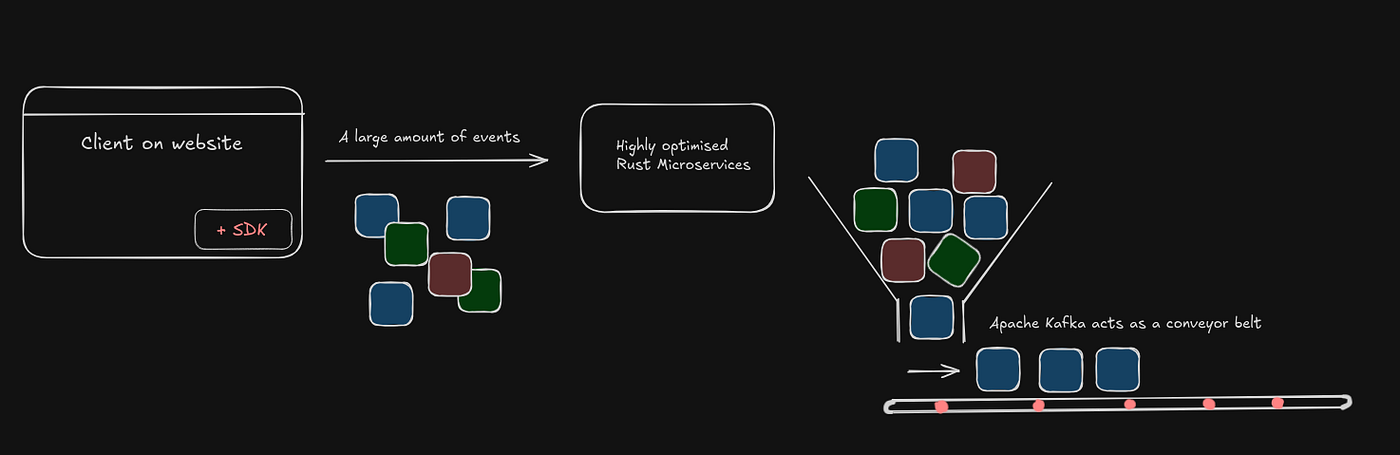
A simplified flow of data
How Can Rust Microservices Be That Fast?
The Rust service has only one aim: respond with a 200 OK as fast as possible.
To do this, it avoids all heavy lifting:
- No database lookups for user details.
- Minimal validation: It only checks the JSON structure of the request and ensures it contains a valid project ID.
- Statelessness: It doesn't remember anything between requests.
Apache Kafka: The Massive Buffer
Kafka acts as a highly scalable, resilient conveyor belt between systems. It safely writes all those incoming events directly to a physical disk in an "append-only log," allowing downstream services to pull data and process events at their own pace. If a worker crashes? No problem. The data just sits safely in Kafka until the worker restarts. Absolutely zero data is lost.
But you might be wondering: "Wait, Kafka writes everything to a physical hard drive? Isn't disk I/O incredibly slow?"
It usually is, but Kafka uses two brilliant architectural techniques to tackle that:
- Sequential I/O: Instead of searching around the disk to modify or insert data in random spots, Kafka only writes to the very end of the file. Sequential disk access is shockingly fast.
- Zero-Copy Principle: Normally, when a database sends data over the network, it has to copy that data from the disk to the OS kernel, then up to the application, then back down to the network buffer, and finally out to the network card. Kafka bypasses the application layer entirely. It tells the operating system, "Take this data from the disk and send it directly to the network socket." Skipping those middle steps prevents major memory copies, resulting in massive CPU savings and blazing speed.
Moving on, let's talk about what happens to this data we have stored in Kafka. We are now moving on to the ingestion system. The data is filtered based on events, and sensitive information is stripped and user identity and session identity is attached to this and sent to ClickHouse.
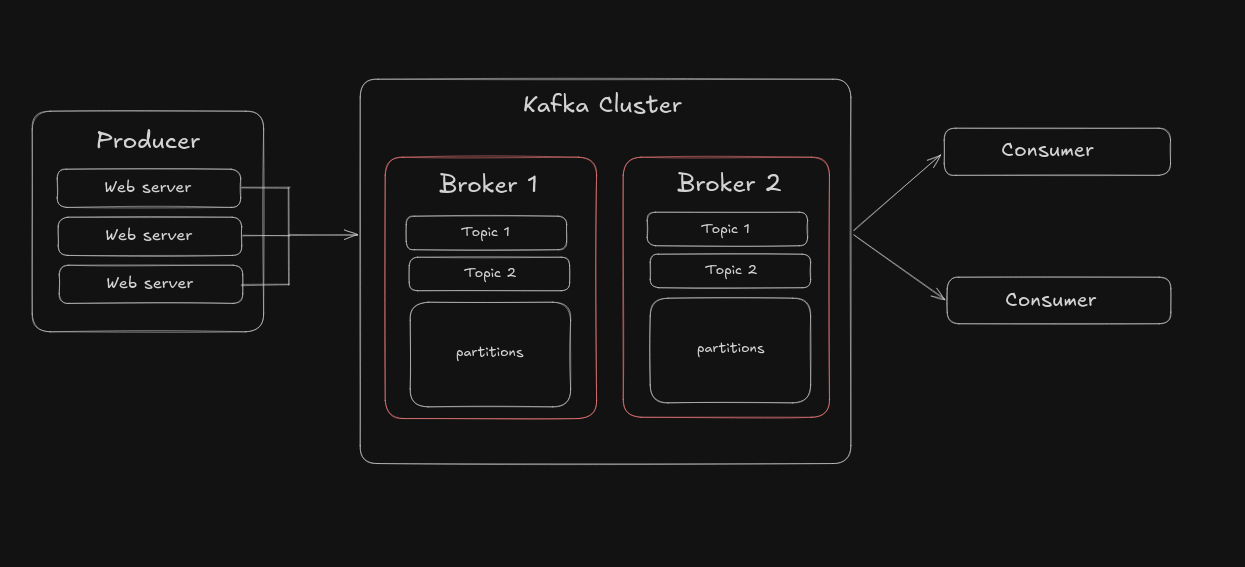
A rough representation of how a Kafka Cluster would look like
Now what the heck is ClickHouse?? 😭
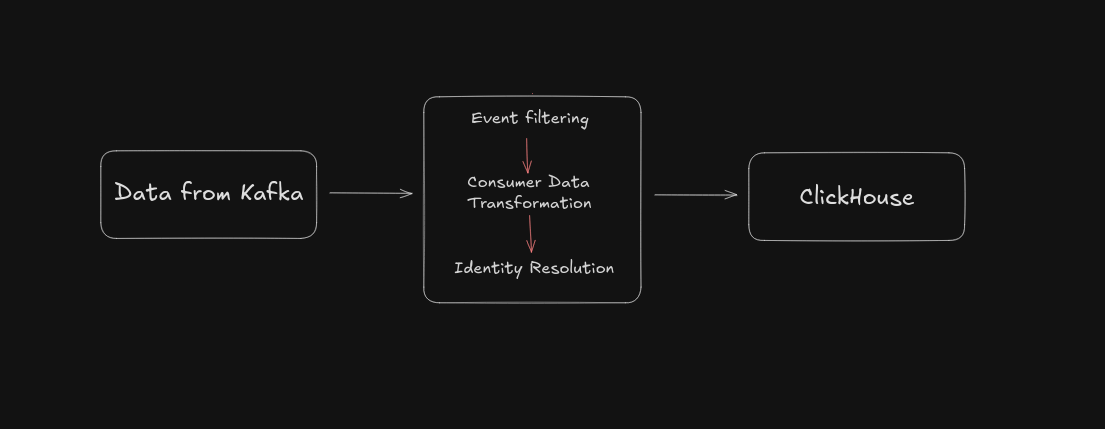
ClickHouse: The Cooler Database
ClickHouse is a blazingly fast, open-source columnar database built for real-time analytical processing (OLAP). It achieves unparalleled query performance by storing data in columns and utilizing hardware-level vectorization, allowing you to generate reports on billions of rows in milliseconds.
Traditional databases like PostgreSQL are great for looking up a single user's profile. But if you ask PostgreSQL to count the number of times a million users clicked a specific button over the last 30 days, it will choke. ClickHouse is designed to answer that exact question instantly.
Okay so this part is really cool, you gotta pay attention.
You might be wondering again, "How is this blazingly fast, bro? It's just a normal database…" Let's look at a quick example. Imagine you have a table with 6 columns (User, Time, Action, Device, Country, Browser), and you want to get the total count of "Views" on your site.
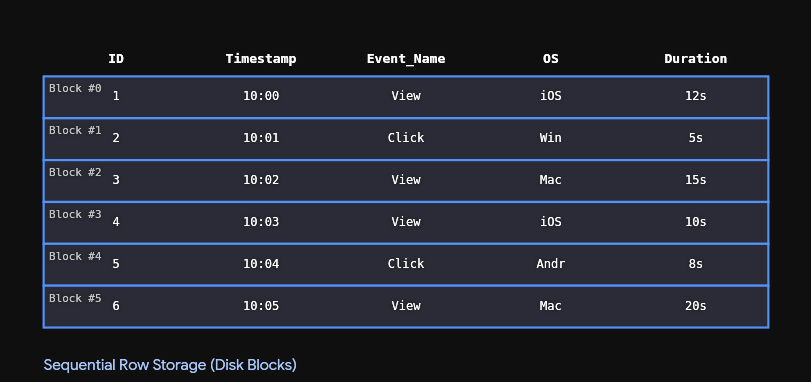
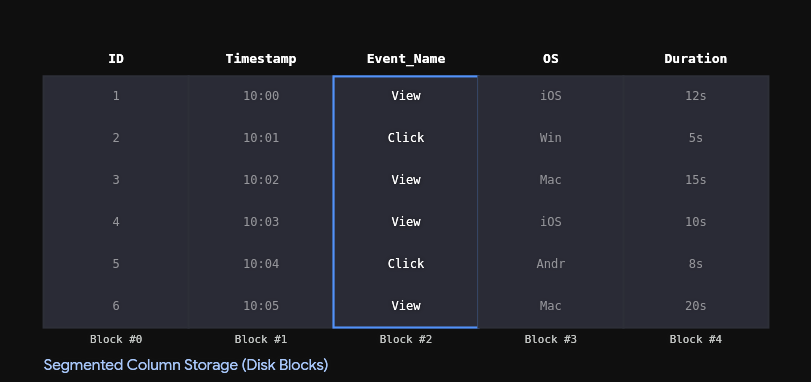
The database completely ignores the other 5 columns. It goes straight to the "Action" column and pulls only that data. Your disk I/O cost drops to a fraction of what it was. Reading 1 column instead of 6 means a massive, instant speedup.
Why Not Use ClickHouse for Everything?
- The "Reconstructing the user" problem: The user's data would be split across multiple columns and stitching them back would cost a lot of resources.
- Nightmare of updating and deleting: ClickHouse is designed to be immutable — updates and deletes are expensive.
- Transactions and money: It's just not possible.
Building a PostHog Clone

Okay, so all that theory is cool and all, but I would like to see it for myself and actually get a session replay of a real person using a website I've built. So, the scope of the project will be to build an SDK in TypeScript, set up an ingestion system in Golang, save all the data in ClickHouse, and finally, render all that data and analysis on a beautiful Next.js dashboard.
Step 1: Collect User Interactions
So first step: collect user interactions and package them into a JSON file.
To do this, I used an open-source package called rrweb. Instead of recording your entire screen, it simply watches for DOM changes — mouse movements, button clicks, typing in input fields — all converted into JSON events and sent to the backend.
To keep performance smooth, data is batched and sent only when hitting a maxBatchSize of 500 events, or at regular time intervals.
1// packages/sdk/src/batcher.ts
2
3export class Batcher {
4  private events: unknown[] = [];
5  private interactions: InteractionEvent[] = [];
6  private telemetry: TelemetryLog[] = [];
7
8  constructor(options: BatcherOptions) {
9    this.flushIntervalMs = options.flushIntervalMs;
10    this.maxBatchSize = options.maxBatchSize ?? DEFAULT_MAX_BATCH_SIZE;
11    this.onFlush = options.onFlush;
12  }
13
14  start(): void {
15    this.timer = setInterval(() => this.flush(false), this.flushIntervalMs);
16  }
17
18  addEvent(event: unknown): void {
19    this.events.push(event);
20    if (this.events.length >= this.maxBatchSize) {
21      this.flush(false);
22    }
23  }
24
25  flush(useBeacon: boolean): void {
26    if (this.events.length === 0 && this.interactions.length === 0
27        && this.telemetry.length === 0) return;
28    const events = this.events;
29    // ... reset buffers ...
30    this.onFlush(events, interactions, telemetry, useBeacon);
31  }
32}
On flush, the payload goes out like this:
1{
2  "sessionId": "...",
3  "events": [ /* rrweb replay blobs */ ],
4  "interactions": [ /* clicks, scrolls */ ],
5  "telemetry": [ /* console, network, vitals */ ]
6}
Step 2: Ingestion with Go + Kafka
Now, this flood of data is received by Apache Kafka. From there, three parallel consumers continuously pull data from this buffer and feed it into ClickHouse.
But here's the catch: instead of sending every single event straight to ClickHouse one by one, the Go server holds the events in memory for a few seconds (or until the buffer hits a certain size). Once that bucket is full, it flushes all 10,000 events into ClickHouse in one massive bulk insert.
1func (w *ClickHouseWriter) FlushTelemetryLogs(ctx context.Context, rows []TelemetryLogRow) error {
2  // ...
3  batch, err := w.conn.PrepareBatch(ctx, `
4    INSERT INTO sighthog.telemetry_logs (
5      session_id, type, sub_type, message, metadata, timestamp
6    )
7  `)
8  // ...
9  for _, row := range rows {
10    if err := batch.Append(
11      row.SessionID,
12      row.Type,
13      row.SubType,
14      row.Message,
15      row.Metadata,
16      row.Timestamp,
17    ); err != nil {
18      // ...
19    }
20  }
21}
Boom. ClickHouse is happy, disk I/O is happy, and our events are safely stored in columns.

Step 3: SeaweedFS for Heavy Replay Data
Okay, I gotta confess. We haven't actually been sticking to a single database.
ClickHouse alone can't handle everything. Raw rrweb outputs are massive — mountains of DOM content. Storing all that unstructured data in a columnar database would defeat the purpose.
Instead, SeaweedFS is used — an open-source object storage system built to hold massive files, videos, and images cheaply and securely.
Step 4: The Next.js Dashboard
I wanted to make a dashboard that feels like home for developers. Think of it like your browser's DevTools panel but with a built-in time machine on the left.
So, when you click on a session, the frontend fires off requests to both systems simultaneously:
- ClickHouse: "Give me all the telemetry logs, console errors, and rage clicks for
session_id=123." - SeaweedFS (S3-compatible): "Hand over the heavy JSON file with all the rrweb DOM mutations."
Both respond in milliseconds. ClickHouse telemetry is stitched into a technical timeline on the right; the SeaweedFS JSON array feeds the player on the left.
Demo Video of SightHog dashboard
The Privacy Landmine
Now, there is some crucial stuff happening under the hood that you wouldn't notice unless you looked closely.
When tracking DOM changes and inputs, you inevitably run into a massive privacy issue: credit card numbers and government IDs. You absolutely cannot send that raw data to your backend.
Your first instinct might be to just write a regex to look for 16-digit numbers and mask them with asterisks.
1const isCreditCard = /^\d{16}$/.test(text);Nah, that won't do it. You'd end up masking other random information like product serial numbers or package tracking IDs.
That's where the Luhn algorithm comes in — a mathematical checksum algorithm baked into almost every credit card, IMEI number, and national provider identifier in the world.
Conclusion

If you made it all the way down here, thank you so much for reading ❤
If there is one major takeaway from this entire experiment, it is that engineering is all about choosing the right tool for the specific job.
More than anything, I realized that building actual products is the absolute best way to learn how real-world tech fits together.
- Project: Sighthog — full documentation and setup guide available.
- GitHub: https://github.com/KingRain/sighthog
That is all for today gang, cheers. o/